
Content management is defined as the structured process of creating, organizing, storing, publishing, and optimizing digital content across channels to support business operations and team collaboration. Modern content management systems, or CMS platforms, have expanded well beyond simple website publishing. Platforms like WordPress, Contentful, and Adobe Experience Manager now handle multi-channel distribution, automated approval workflows, and AI-driven content intelligence. For business teams managing complex digital workflows, selecting the right tools and practices determines how efficiently content moves from creation to publication. This guide covers the 7 essential features that define effective systems, how to choose the right platform, and the best practices that reduce friction across teams.
What are the key features of modern content management systems?
A modern CMS is defined not by its ability to publish web pages, but by its capacity to manage content across multiple channels through API-driven delivery, structured workflows, and governance controls. The distinction matters because businesses today distribute content to websites, mobile apps, email platforms, and AI-driven interfaces simultaneously. A system that handles only one channel creates bottlenecks.
The 7 core features that experts consistently identify in effective content management tools are:
- Automated visual workflow builders: Route content through creation, review, and approval stages without manual handoffs, reducing delays and missed steps.
- Role-based access control: Assign permissions by function so writers, editors, legal reviewers, and publishers each see and act on only what their role requires.
- Real-time collaboration and co-editing: Allow multiple contributors to work on the same content simultaneously, with comments and version tracking built in.
- AI-powered content intelligence: Surface optimization suggestions, automate tagging, and flag content gaps based on performance data.
- Multi-channel distribution: Publish content to websites, apps, social platforms, and email from a single interface using API-driven delivery.
- Version control and audit trails: Track every change, revert to prior versions, and maintain a clear record for compliance and governance.
- Integrations with marketing, analytics, and CRM platforms: Connect content operations to tools like Salesforce, Google Analytics, and HubSpot to link content performance to business outcomes.
Effective platforms unify workflow, governance, and accountability into one system, automating approvals and communication to reduce friction in publishing. This is the operational difference between a CMS that manages pages and one that manages an entire content operation.
Pro Tip: When evaluating any CMS, test the workflow builder before the content editor. A system with a weak workflow engine will create manual workarounds that slow every publishing cycle.
How to choose the right content management system for your team
Choosing a CMS depends on three variables: team size, technical capability, and the complexity of your content workflows. Getting this wrong is the most common and costly mistake in content tool selection.

Non-technical teams benefit most from no-code platforms that offer drag-and-drop interfaces and pre-built workflow templates. Tools like Monday.com and HubSpot fall into this category. They prioritize ease of adoption and governance without requiring developer resources. For teams managing editorial calendars, campaign content, or internal knowledge bases, these platforms deliver fast time-to-value. Iris covers several of these options in its website builder comparisons for teams with limited technical resources.
Technical and enterprise teams have different requirements. Headless CMS architecture decouples the backend content repository from the front-end presentation layer, delivering content via APIs to any digital touchpoint. Platforms like Contentful and Sanity are built on this model. They offer maximum flexibility for developers building custom front-end experiences, but they require technical resources to configure and maintain.
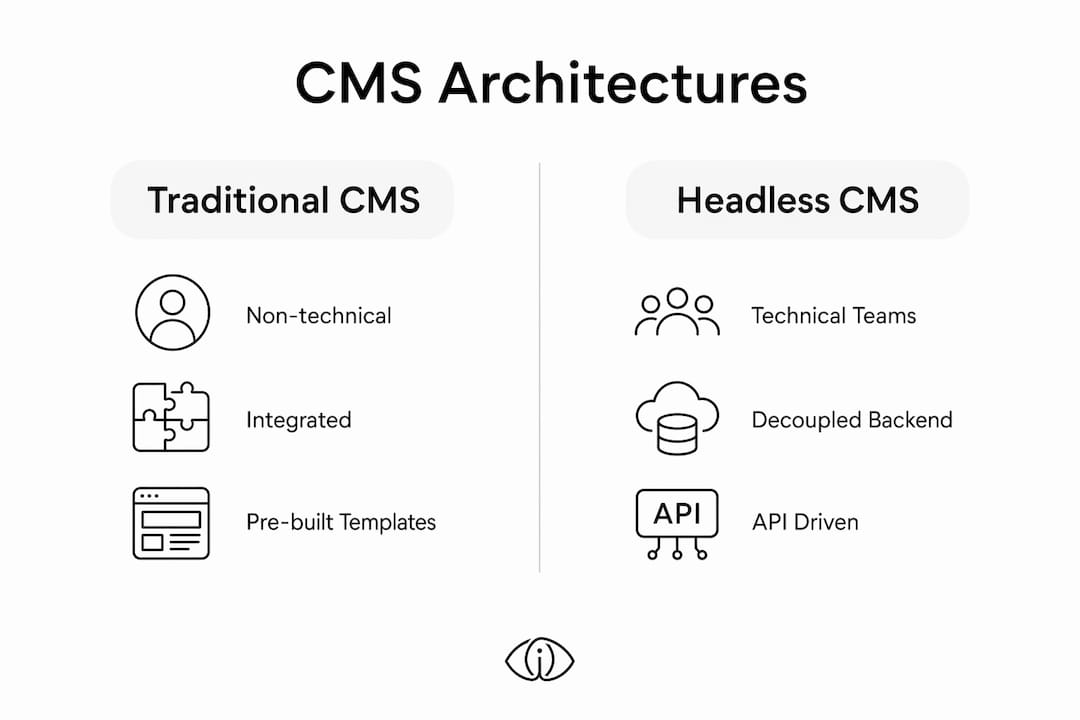
The table below maps CMS architecture types to team profiles:
| Architecture | Best for | Examples | Key trade-off |
|---|---|---|---|
| Traditional CMS | Non-technical editorial teams | WordPress, HubSpot CMS | Limited API flexibility |
| Headless CMS | Developer-led enterprise teams | Contentful, Sanity | Requires front-end development |
| Hybrid CMS | Mixed technical and editorial teams | Acquia, Sitecore | Higher cost and complexity |
| No-code platforms | Small to mid-size business teams | Monday.com, Softr | Less customization depth |
Integration capability is a deciding factor that teams underweight during evaluation. A CMS that cannot connect to your existing CRM, analytics platform, or marketing automation stack creates data silos. Before committing to any platform, map your current digital stack and confirm native integrations or API availability for each critical tool.
Pro Tip: Run a two-week pilot with your actual content team before signing a contract. Feature lists look similar across platforms. Real workflow friction only surfaces under live conditions.
Top content management platforms and tools for businesses in 2026
The CMS market in 2026 spans a wide range of architectures and use cases. The platforms below represent the most widely adopted and evaluated options across business segments.
-
WordPress: WordPress powers roughly 43% of the web, making it the most widely deployed CMS globally. Its open-source architecture supports thousands of plugins for SEO, workflow management, and e-commerce. It suits editorial teams and small to mid-size businesses well, though enterprise governance requires additional configuration.
-
Contentful: A leading headless CMS built for enterprise teams requiring structured content delivery across multiple digital channels. Contentful uses a content model approach where editors define schemas and content types, enabling consistent multi-channel reuse. Its API-first architecture integrates with virtually any front-end framework.
-
Sanity: Similar to Contentful in its headless architecture, Sanity differentiates through its real-time collaborative editing environment and highly customizable content studio. Development teams favor it for projects requiring tight control over the content editing experience.
-
Adobe Experience Manager (AEM): AEM combines digital asset management with multi-channel content delivery, providing automated tagging and structured approval workflows for large organizations. It is the platform of choice for enterprises with complex brand governance requirements and large media libraries.
-
Monday.com: A unified work and content management platform that connects editorial workflows to broader project management. Its visual workflow builder and template library make it accessible to non-technical teams managing content calendars and campaign production.
-
Lark: A collaboration-first platform that integrates content and work management into a single environment, connecting creative projects to business objectives. Lark suits teams that need document collaboration, task management, and content publishing in one place.
Pro Tip: For teams evaluating enterprise options, request a sandbox environment with your actual content types loaded. Generic demos rarely expose the governance and permissions gaps that matter most at scale.
Best practices for managing digital content workflows and collaboration
Effective digital content management requires more than selecting the right platform. The operational practices that govern how content moves through your organization determine whether your tools deliver their full value.
-
Define structured workflows before configuring your CMS. Map every stage of your content lifecycle, from brief to publication, and identify who owns each step. Visual workflow builders that combine creation, approval, and reporting provide structured management of large-scale content production, improving visibility and resource planning. Build the workflow in your CMS only after the process is documented.
-
Implement role-based permissions from day one. Access control is not just a security measure. It is a governance mechanism that enforces accountability. When writers cannot publish without editorial review, and editors cannot bypass legal approval, the workflow becomes self-enforcing.
-
Use AI features to reduce manual work, not replace editorial judgment. AI-powered tagging, content scoring, and optimization suggestions accelerate production. They do not replace the strategic decisions that determine whether content serves a business goal. Treat AI outputs as inputs to human review, not final decisions.
-
Treat content as structured data. Successful CMS implementations define content as structured data with defined schemas and types rather than unstructured HTML. This approach enables multi-channel reuse, automated workflow triggers, and consistent governance across large content libraries.
-
Connect content performance to business outcomes. Integrate your CMS with analytics platforms and CRM tools so that content performance data flows back into planning decisions. Content that cannot be measured cannot be optimized.
Pro Tip: Schedule a quarterly content audit as a standing calendar event. Teams that review content performance on a fixed cadence consistently outperform those that audit reactively after campaigns underperform.
Key takeaways
Effective content management requires structured workflows, role-based governance, and platform selection aligned to team technical capability and business scale.
| Point | Details |
|---|---|
| Define workflows before selecting tools | Map your content lifecycle and approval chain before evaluating any CMS platform. |
| Match platform to team profile | Non-technical teams need no-code tools; enterprise teams need headless or hybrid CMS architectures. |
| Treat content as structured data | Schema-defined content enables multi-channel reuse and automated workflow triggers. |
| Integrate with your existing stack | A CMS disconnected from your CRM and analytics creates data silos that limit performance visibility. |
| Audit content performance on a fixed cadence | Regular performance reviews convert content operations from reactive to strategic. |
Why content management is the infrastructure layer most businesses underinvest in
Most organizations treat their CMS as a publishing tool and nothing more. That framing is the root cause of most content operation failures I have observed. When a CMS is configured only to push pages live, it becomes a bottleneck rather than an accelerator. The approval chains are manual, the governance is informal, and the connection between content output and business performance is invisible.
The boundary between content management and work management is increasingly blurred, with platforms offering unified solutions that handle content and task workflows in a single environment. This convergence is not a trend to watch. It is already the operational reality for the most productive content teams. Platforms like Monday.com and Lark are not just CMS alternatives. They are evidence that content operations and business process management are the same problem.
The best CMS solutions are those that manage the entire information flow, linking content creation to business outcomes. That definition should be the filter for every platform evaluation. If a system cannot tell you how a piece of content contributed to pipeline, retention, or conversion, it is managing files, not content operations.
The most common mistake I see is selecting a platform based on feature count rather than workflow fit. A CMS with 200 features that your team uses 12 of is not a powerful tool. It is a liability that creates training overhead and adoption resistance. Prioritize the platforms where the workflow your team actually runs is the default configuration, not a custom build.
— Dustin
Find the right content management platform for your team
Business teams that need to move fast on content operations without deep technical resources have more options than ever in 2026. The challenge is not finding a platform. It is finding one that fits your workflow without requiring a full IT implementation to get started.
Iris has evaluated several no-code and low-code content management platforms suited to mid-market business teams. The Softr review covers a no-code platform that lets non-technical teams build content portals, client-facing databases, and internal knowledge bases without developer support. For teams that need an accessible CMS with strong design flexibility, the Wix platform review provides a detailed breakdown of its content management capabilities, SEO tools, and workflow features. Both evaluations are structured to support direct platform comparisons rather than generic recommendations.
FAQ
What is content management in a business context?
Content management is the structured process of creating, organizing, publishing, and optimizing digital content across channels to support business operations. It encompasses both the technology platforms, such as CMS tools, and the workflows that govern how content moves from creation to publication.
What is the difference between a traditional and headless CMS?
A traditional CMS couples the content repository with the front-end presentation layer, while a headless CMS delivers content via APIs to any digital touchpoint independently of the presentation layer. Headless architectures offer greater flexibility for enterprise teams managing content across multiple channels simultaneously.
Which content management tools are best for non-technical teams?
No-code platforms such as Monday.com, HubSpot CMS, and Softr are best suited for non-technical teams, offering drag-and-drop interfaces and pre-built workflow templates that require no developer resources to configure or maintain.
How does WordPress compare to enterprise CMS platforms?
WordPress powers approximately 43% of the web and suits editorial and small to mid-size business teams well, but enterprise governance and multi-channel delivery typically require platforms like Contentful, Adobe Experience Manager, or Acquia that offer structured content models and advanced API delivery.
What is content lifecycle management?
Content lifecycle management is the practice of governing content from initial creation through publication, performance tracking, and eventual archiving or removal. Effective lifecycle management connects content operations to business outcomes by integrating CMS platforms with analytics and CRM tools to measure impact at every stage.